Workflow
The basic workflow consists of the following steps:
Reading data from a file
Assign names to IP addresses
(Optional) Train a model to recognize the devices
Read new data from another file
Identify the devices within the new data
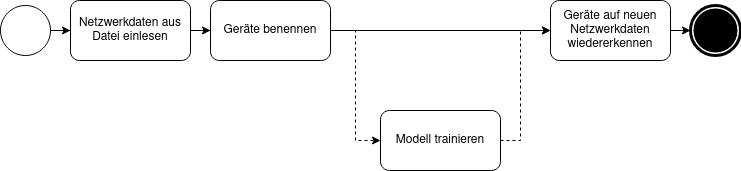
CLI Workflow
First, read a file with the read command.
This will add the network data to SmartHomeBuddy’s database.
Depending on the size of the data, this can take a while.
The option measurement is not mandatory, but we recommend using it on order better structure your data.
If you leave measurement empty, it will default to main.
Note that one IP address should always belong to the same device within one measurement.
If you insert data from multiple networks, where the same IP address might belong to different devices, you should use different measurements.
shbdeviceidentifier read --measurement "train-data" path/to/file.pcap
Then read a file that contains the names for the IP addresses contained in the network data.
shbdeviceidentifier read-labels --measurement "train-data" path/to/labels.json
The labels must be formatted as follows:
{
  "192.168.178.41": {
    "name": "Desktop"
  },
  "192.168.178.45": {
    "name": "Google-Nest-Mini"
  },
  "192.168.178.44": {
    "name": "Google-Nest-Mini"
  },
}
Next, a user might want to train a model to recognize the devices. We will use the data that we just read.
shbdeviceidentifier train --measurement "train-data"
Now, we can read new data and identify it.
shbdeviceidentifier read --measurement "new-data" path/to/file.pcap
shbdeviceidentifier identify --measurement "new-data"